· Torsten · 17 min read
Getting started with Betterplan
This article shows you how Betterplan is structured and how the individual areas work together — from the first endeavor to the Delivery Timeline.

Welcome! This article shows you how to work with Betterplan and how the individual areas fit together. You don’t have to understand everything at once. Betterplan is built so that you can find your way step by step. The goal here is to show you the thread connecting everything.
The phases
Every endeavor moves through four phases — and not just once, but repeatedly:
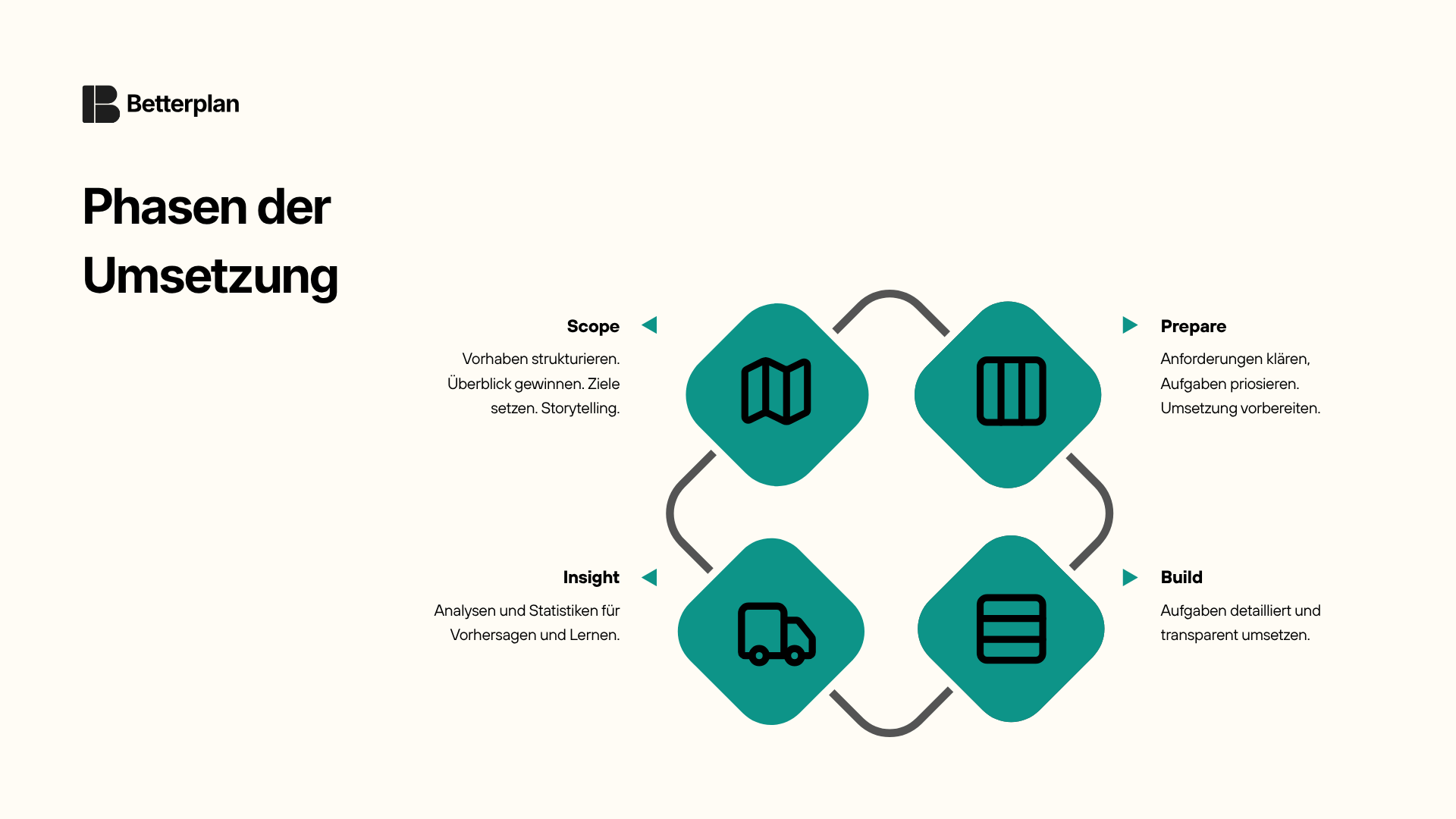
This is no accident; it’s the foundation of iterative work: plan, prepare, execute, review, and use the insights to kick off the next cycle. If you know PDCA, you’ll recognize the pattern.
- Scope: Set goals and structure the endeavor. From big to small: What do we want to achieve? What does it all involve? How does it connect? This is where the shared picture takes shape.
- Prepare: Prioritize and prepare the work. What’s most important? What has to happen first? Are the tasks truly understood and ready to be implemented?
- Build: Execute. Work happens in short cycles with clear transparency about who is working on what.
- Insight: Keep the overview. Where do we stand? When are we likely to be done? What has influenced the course so far?
For each of these phases, Betterplan provides its own main view: the Story Map (Scope), the Backlog (Prepare), the Iteration Board (Build), and the Delivery Timeline (Insight). All views stay connected to one another. Whatever you change in one is immediately current everywhere else.
The building blocks — from goal to smallest task
Before we dive into the individual views, a quick look at the building blocks you work with in Betterplan. They fall into two groups: those that create structure, and those that get implemented.
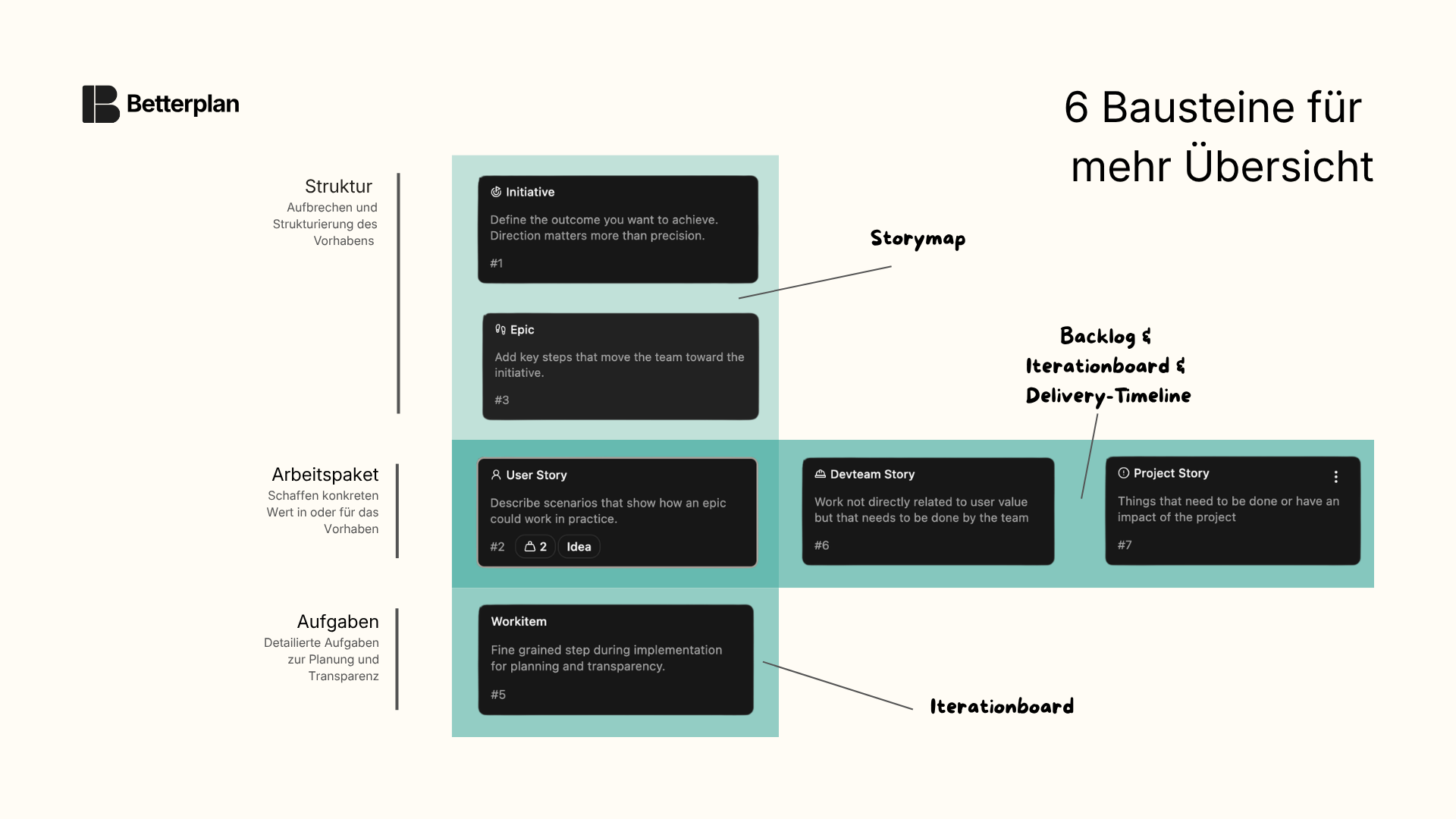
For structuring, you’ll find on the Story Map:
- Initiatives describe a large goal. They are not worked on directly — they set the direction.
- Epics are the sub-goals beneath them: the steps a user must take to reach their goal. Epics are not implemented themselves; they structure the path.
For implementation: Everything that needs to be built ends up in the Backlog:
- User Stories describe different options for how a user can take a step, and can also represent maturity stages. An Epic “Search” might contain the User Stories “Basic text search,” “Text search with autocomplete,” and “Filter options,” for example. User Stories represent concrete value from a user’s perspective.
- Project Stories cover cross-cutting topics within the endeavor that have no direct user value but still need to be done — such as procuring hardware, maintaining documentation, or sorting out organizational matters. They are also a good fit for capturing important events and decisions that have influenced the course of the endeavor.
- Devteam Stories cover cross-cutting topics from the implementation itself: refactoring, build pipelines, technical debt. Everything needed to keep delivering good results, even when it isn’t directly visible to the user.
- Workitems are the smallest unit. They belong to a Story and help plan and coordinate its implementation. Workitems appear only on the Iteration Board and are primarily relevant to the implementing team, not to planning.
Open or Closed
Every Story in Betterplan is either Open or Closed.
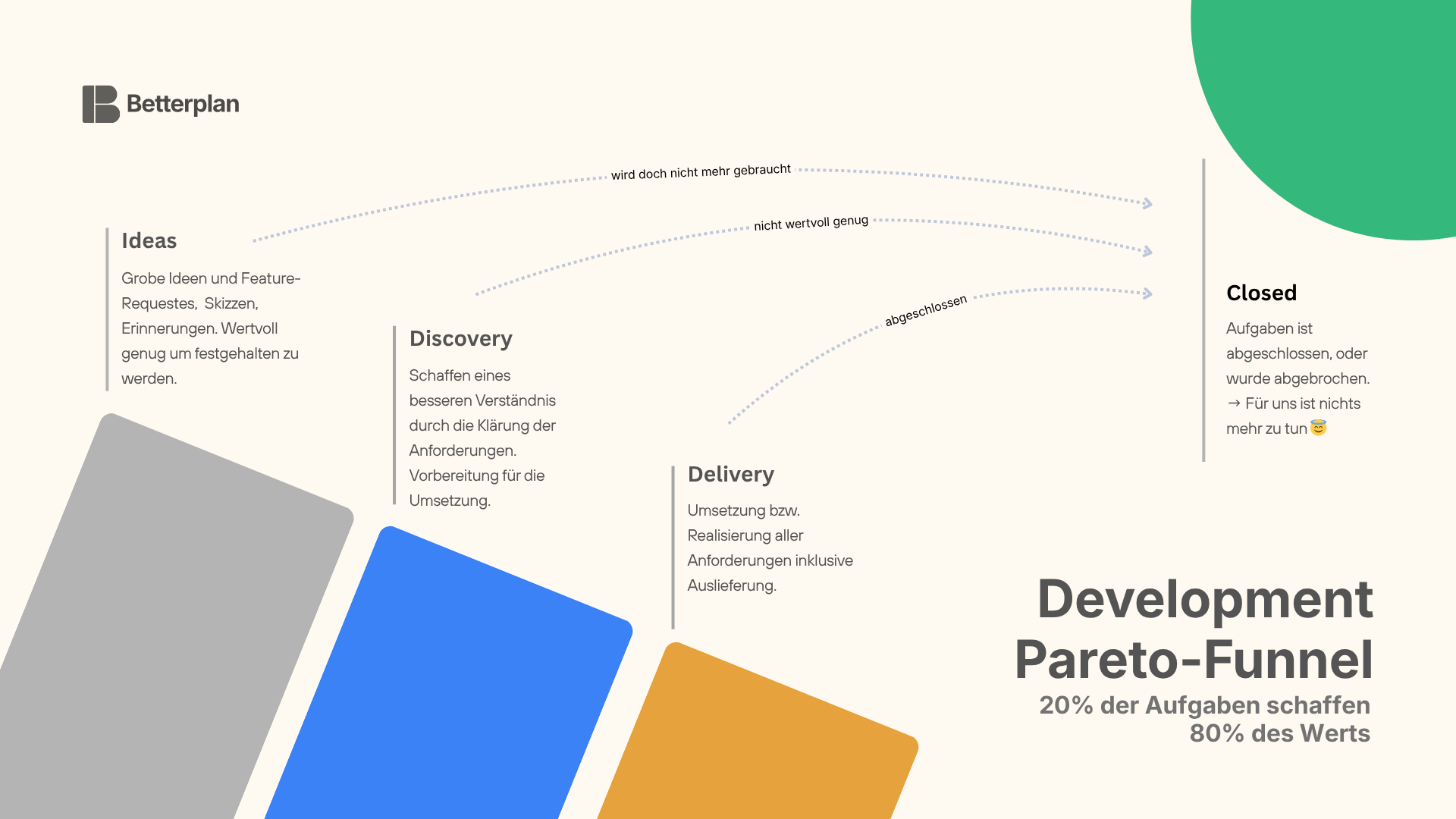
Open means: this Story is still in progress. Over its lifetime, an open Story moves through three major phases, which you can also see in the diagram: it starts as an Idea, is explored and thought through in Discovery, and eventually enters Delivery, where it is implemented. As long as it is anywhere along that path, it is open. That holds even when the team has finished its work. Perhaps the customer sign-off is still missing, the deployment is pending, or a manual confirmation is needed. The work may be done, but the Story is only truly finished when it is consciously closed.
Closed means: this Story is complete — whether successfully delivered or deliberately stopped. Both are valid endings, and that’s exactly what makes this concept so important: a Story can be closed at any point, in any phase. Even an early idea or a half-explored discovery can have a clear conclusion.
Why? Not every Story that begins as an idea needs to be implemented. Experience shows that roughly 20% of Stories are responsible for 80% of the value. Closing Stories along the way when they turn out not to be valuable enough is not failure. It is the right way to handle limited resources — not letting things go dormant, but making a deliberate decision. Closed Stories remain visible in green on the Story Map; anyone who wants to hide them simply uses the filter.
Maturity levels — a story’s path
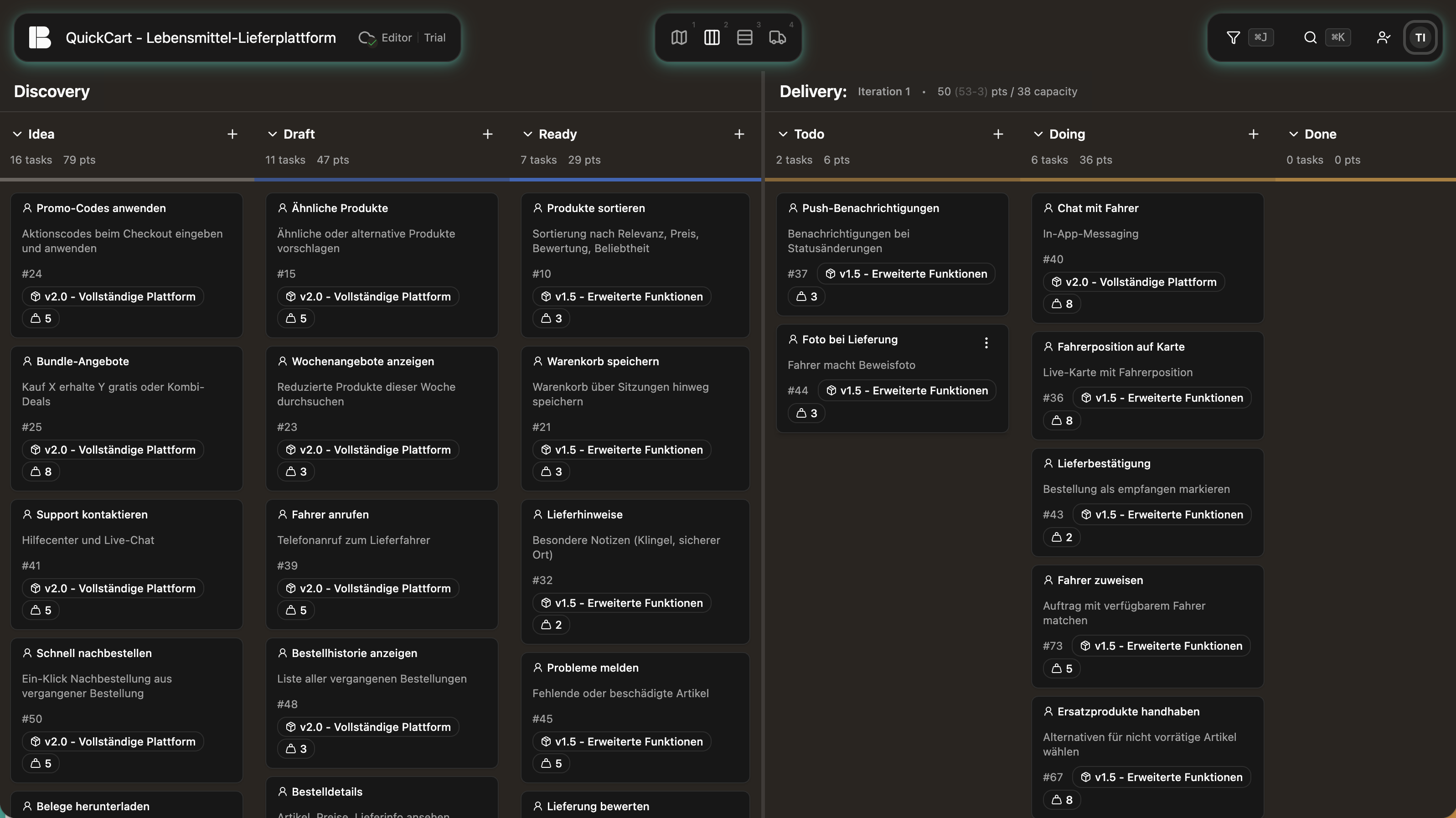
As long as a Story is open, it moves through six states, split across two phases:
Discovery: Idea → Draft → Ready: this is where a Story is clarified, thought through, and prepared.
Delivery: Todo → Doing → Done: this is where it is implemented and delivered.
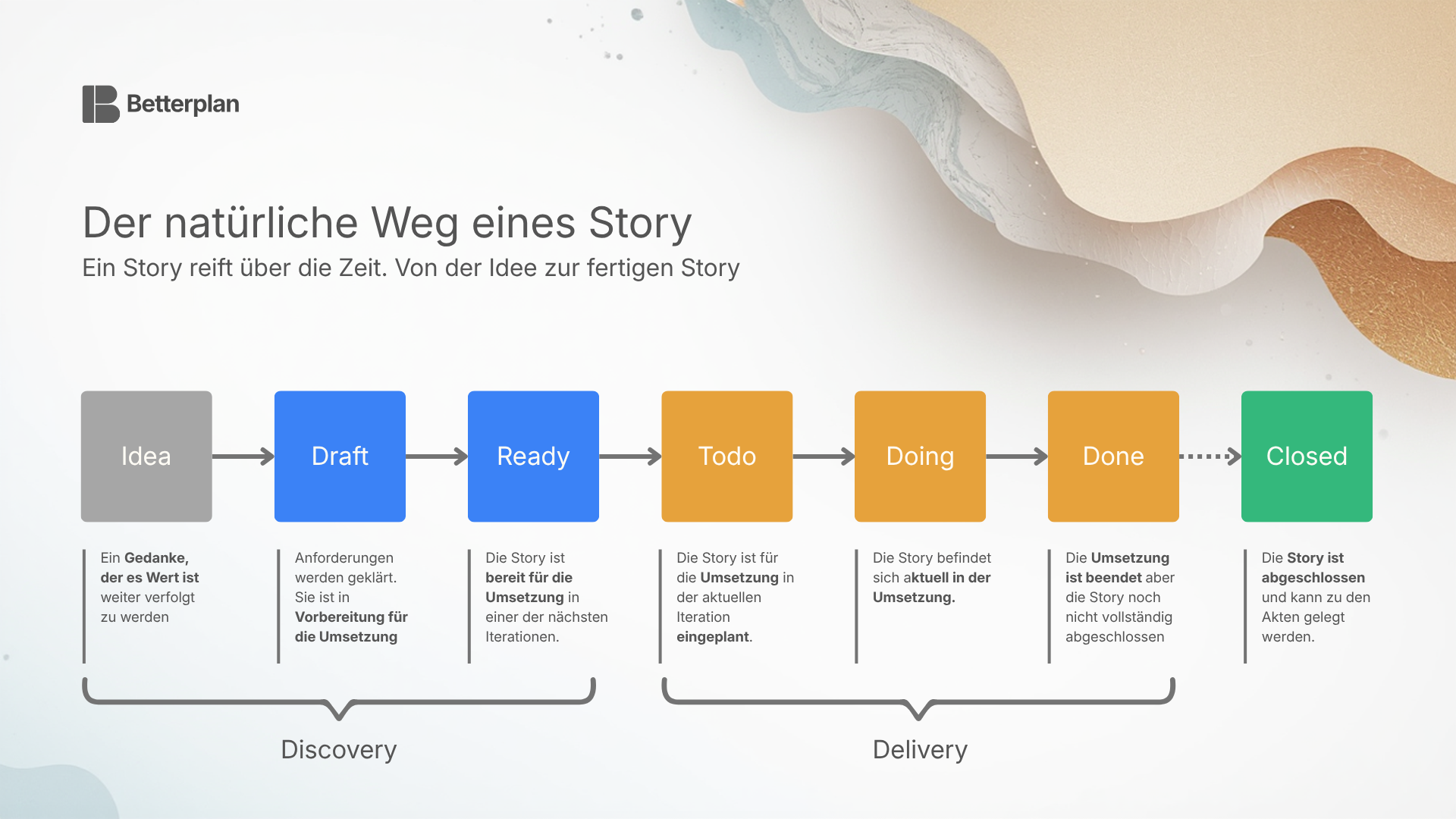
The colors on the cards and in the Minimap show you at a glance where a Story stands:
- ⬜ Idea (grey): The beginning. A Story exists as a thought but has not yet been developed further.
- 🔵 Draft (blue): The Story is being actively explored (Discovery-Track). Requirements are being clarified, questions answered, details worked out.
- 🔵 Ready (blue): The Story is fully thought through and ready for implementation. Ready is the transition point. Here it waits in the Backlog to be scheduled for implementation in a future iteration (Delivery-Track).
- 🟠 Todo (orange): The Story is scheduled for an iteration but hasn’t been started yet.
- 🟠 Doing (orange): It is being actively worked on.
- 🟠 Done (orange): The Story has been implemented and delivered.
- 🟢 Closed (green): The Story is complete.
Discovery and Delivery remain within one Story. There are no separate tickets for clarification and implementation. All knowledge collects in one place, and you can see at any time where a Story currently stands — even when Discovery and Delivery take place in different, widely separated iterations.
Scope — create structure
Every endeavor starts by breaking the big picture into its parts. Before you prioritize or plan anything, you first need an overview: What does it all involve? What areas are there? What connects?
That’s what the Story Map is for. Think of it as a map of your endeavor. From left to right, it lays out the major sections and steps. From top to bottom, you can see what is more important and what is less. You get an immediate sense of where the gaps are, what belongs together, and where the focus lies.
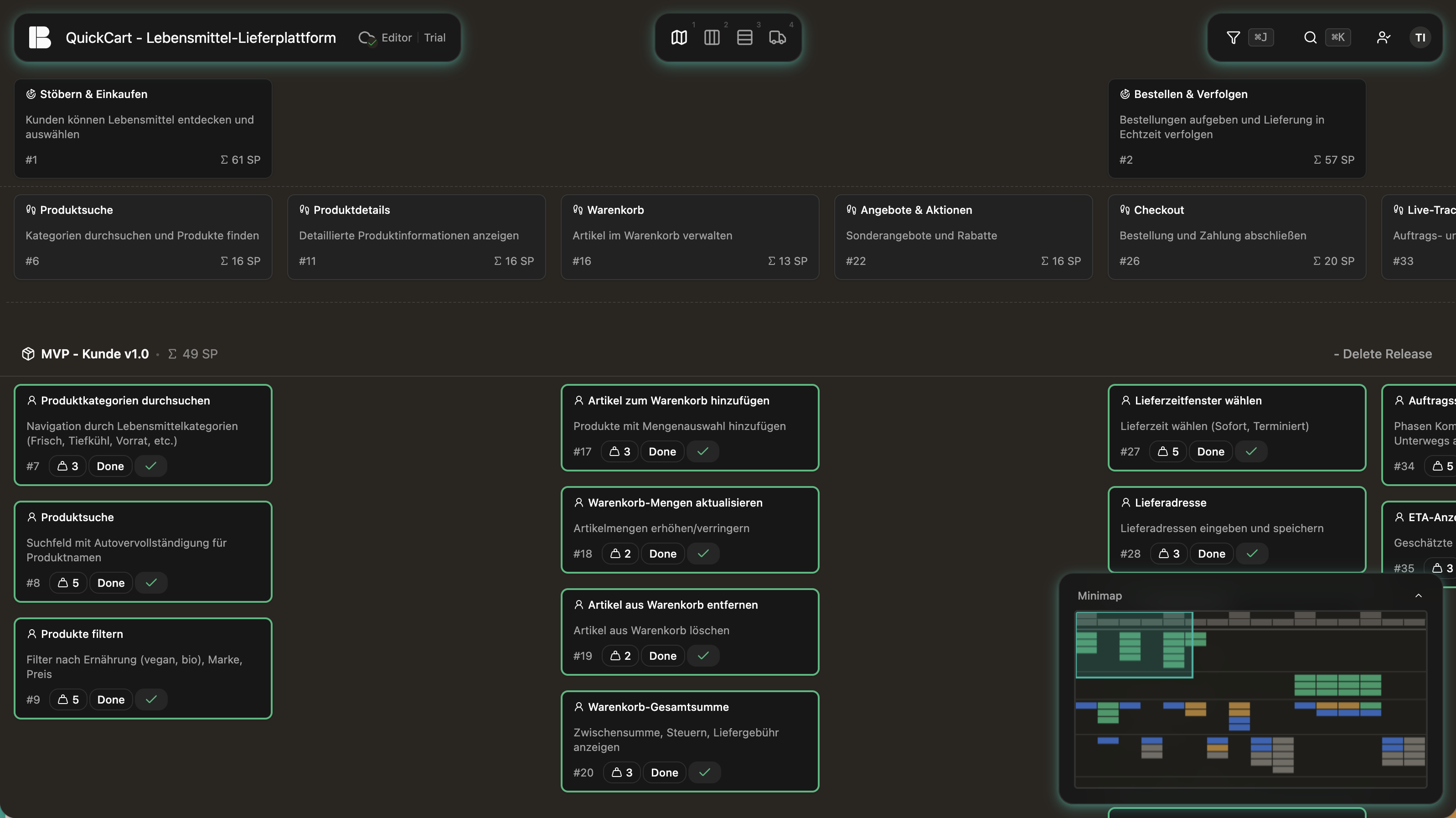
The Story Map is the heart of Betterplan. This is where the shared picture is created — the reference point everyone uses. Everything else builds on it. This view is designed for everyone: those who plan the endeavor, those who implement it, and those who want to keep the overview.
On the Story Map you also create Releases: meaningful delivery milestones to which you assign individual Stories. A Release is created via the Add button on the Story Map. This lets you structure the endeavor not only by content but also by time. What belongs in the first Release, and what comes after?
The concept of the Story Map goes back to Jeff Patton. Those who want to go deeper will find a thorough introduction in his book User Story Mapping.
Shortcuts on the Story Map: d shows a Story’s dependencies. When hovering over a Story, n creates a new task beneath it and c opens the comment area to start discussions with teammates.
Pro tip: Think of the Story Map as a screenplay. It tells the story of your user or customer within your endeavor. What goals do they have? What steps do they go through to reach them? The goals become Initiatives, the steps become Epics. When the story is right, the structure is right too.
Minimap and overview
As an endeavor grows, it’s easy to lose the overview on the Story Map. The Minimap in the lower right corner shows you your entire endeavor in a compact view — all Stories color-coded by maturity level. You can see at a glance how progress is distributed: How much is still grey (Idea)? How much blue (Discovery)? How much orange (Delivery)? A click in the Minimap jumps directly to the corresponding position on the Map.
Prepare — prioritize and think through
An overview alone isn’t enough. Before anything is implemented, the question must be clear: Is this task truly understood? Is it ready?
In the Backlog you see all Stories in a Kanban view, organized by their maturity levels. You get an immediate sense of which Stories are still ideas, which are being thought through, and which are ready for implementation. The Backlog is the view for everyone who prepares and prioritizes work — typically product owners or project leads.
Prioritization — stop starting, start finishing
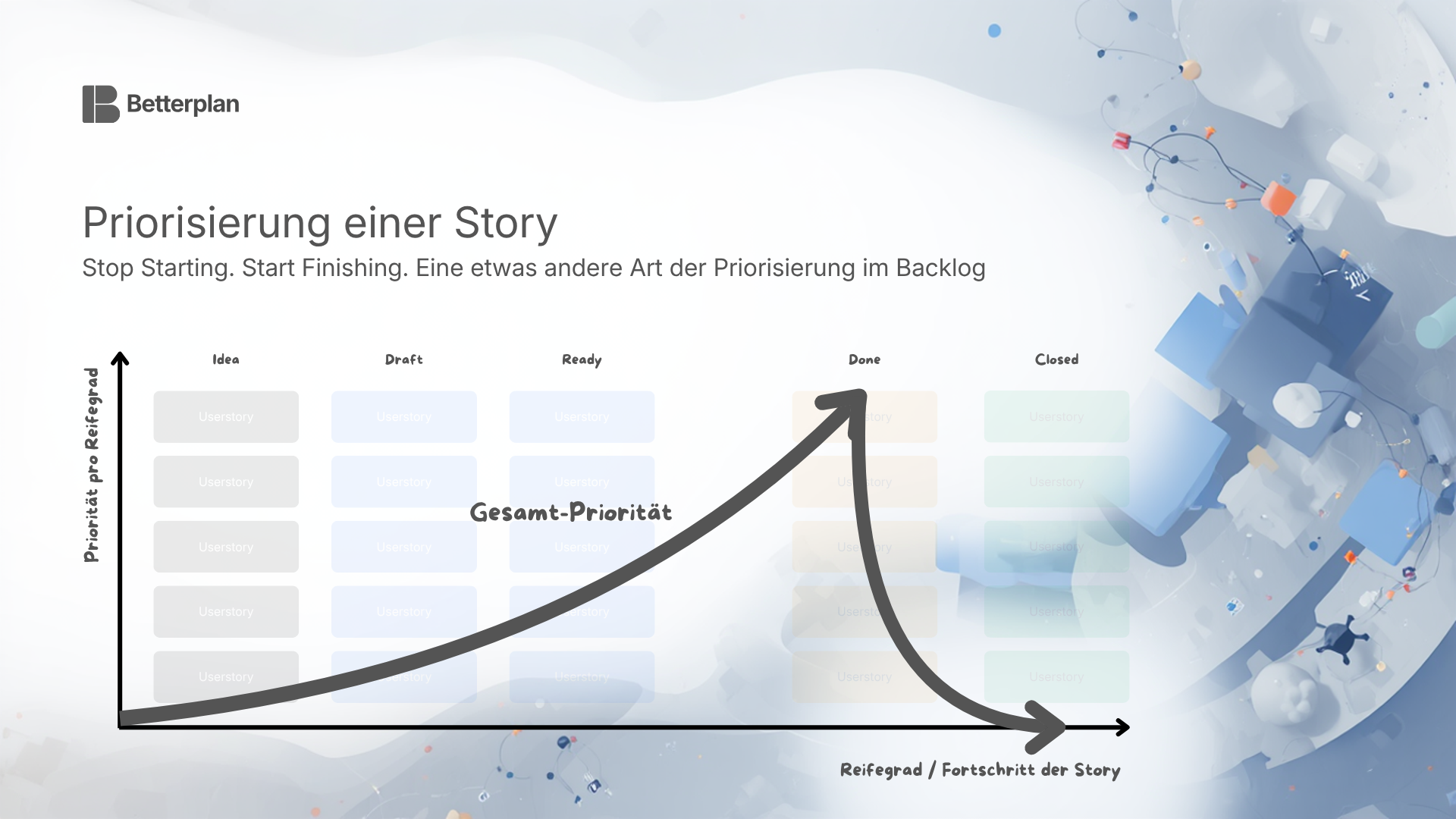
Prioritization in the Backlog follows a simple principle: whatever is furthest along gets the highest priority. A Story already in progress takes precedence over one still in draft. Finish first, then start something new.
Within each stage, the top-to-bottom order determines priority. What’s at the top is up next.
Pro tip: Use the Story Map for your initial prioritization. If you’ve told your story correctly, the structure will inevitably suggest a first step that must happen before the second.
Bugs & unplanned tasks
Day-to-day work is rarely as orderly as the plan. Bugs appear, things come in, priorities shift.
For bugs and rework: the affected Story simply goes back to Todo and moves through implementation again. The knowledge stays on the Story, not scattered across separate bug tickets.
Unplanned tasks that can’t be assigned to an existing Story land in the Backlog as a Devteam Story (technical cause) or Project Story (organizational topic), and are prioritized there like any other Story.
Build — working in iterations
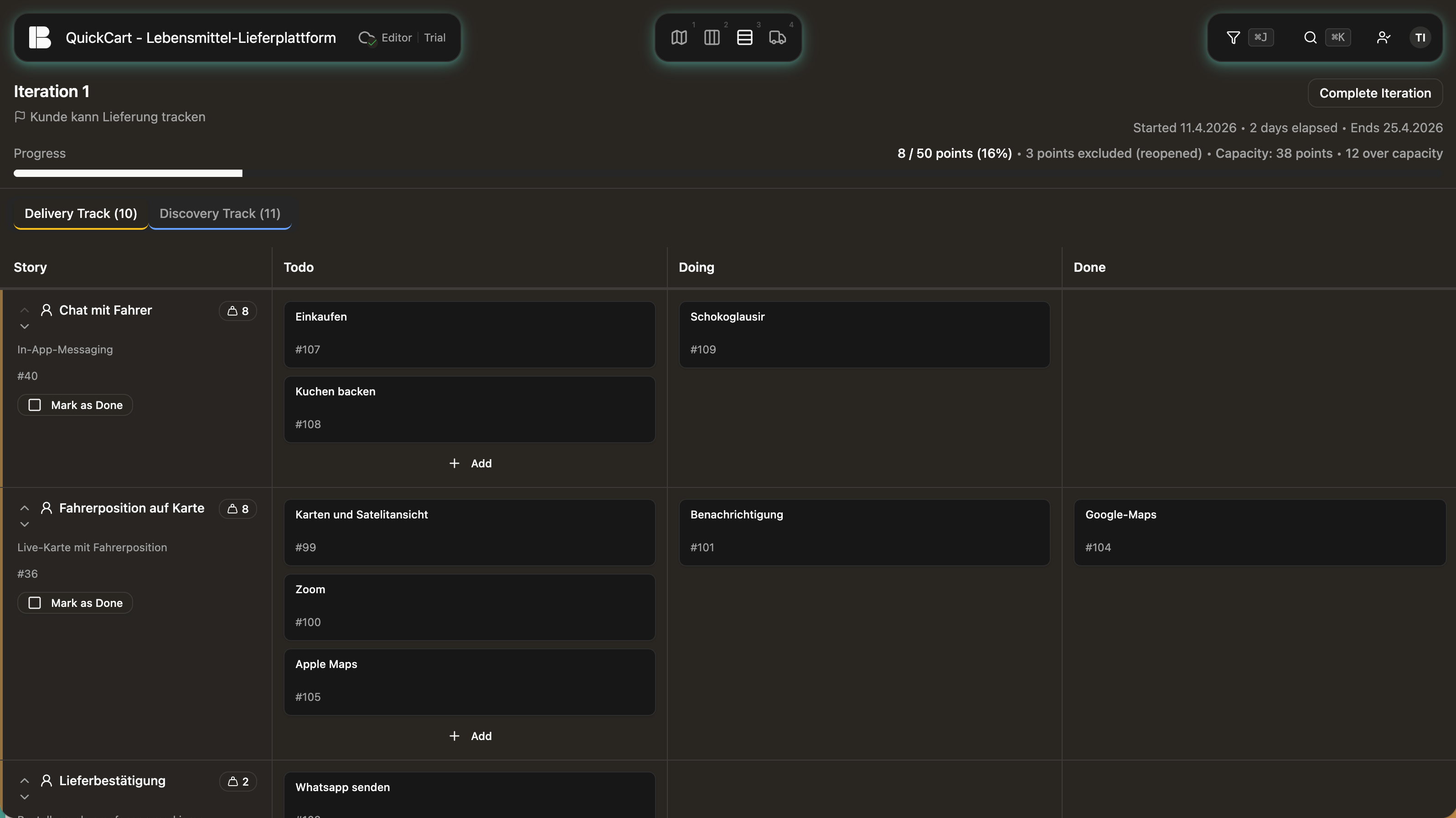
An Iteration is a fixed time period during which focused work takes place. Each iteration has two tracks: in the Discovery-Track, Stories are explored and prepared (Draft → Ready); in the Delivery-Track, they are implemented and delivered (Todo → Doing → Done). Both tracks run in parallel. The team can therefore explore new Stories in the same iteration while simultaneously implementing prepared ones.
Which track a Story appears in is decided automatically by Betterplan based on its progress. From Draft through Ready it appears in the Discovery-Track. From Todo onward it is in the Delivery-Track and stays there until it is truly complete.
The first iteration is created automatically as soon as you move the first Story into a Discovery or Delivery status. Betterplan creates it in the background. When an iteration ends, a new one is started automatically. Open Stories are carried over to the next iteration.
The Iteration Board is the workspace for the implementing team. Think of it as a small Kanban board for each Story: every Story has its Workitems, which move through columns such as “Open,” “In Progress,” and “Done.” This creates maximum transparency in the detail — ideal for recurring check-ins or Daily Standups where the team wants to see quickly where each task stands.
Context is never lost in the process. The connection to the Story Map is maintained. You always know why you’re working on a task, not just what needs to be done.
Insight — keep the overview
The most important question in any endeavor: Where do we stand? And when are we likely to be done?
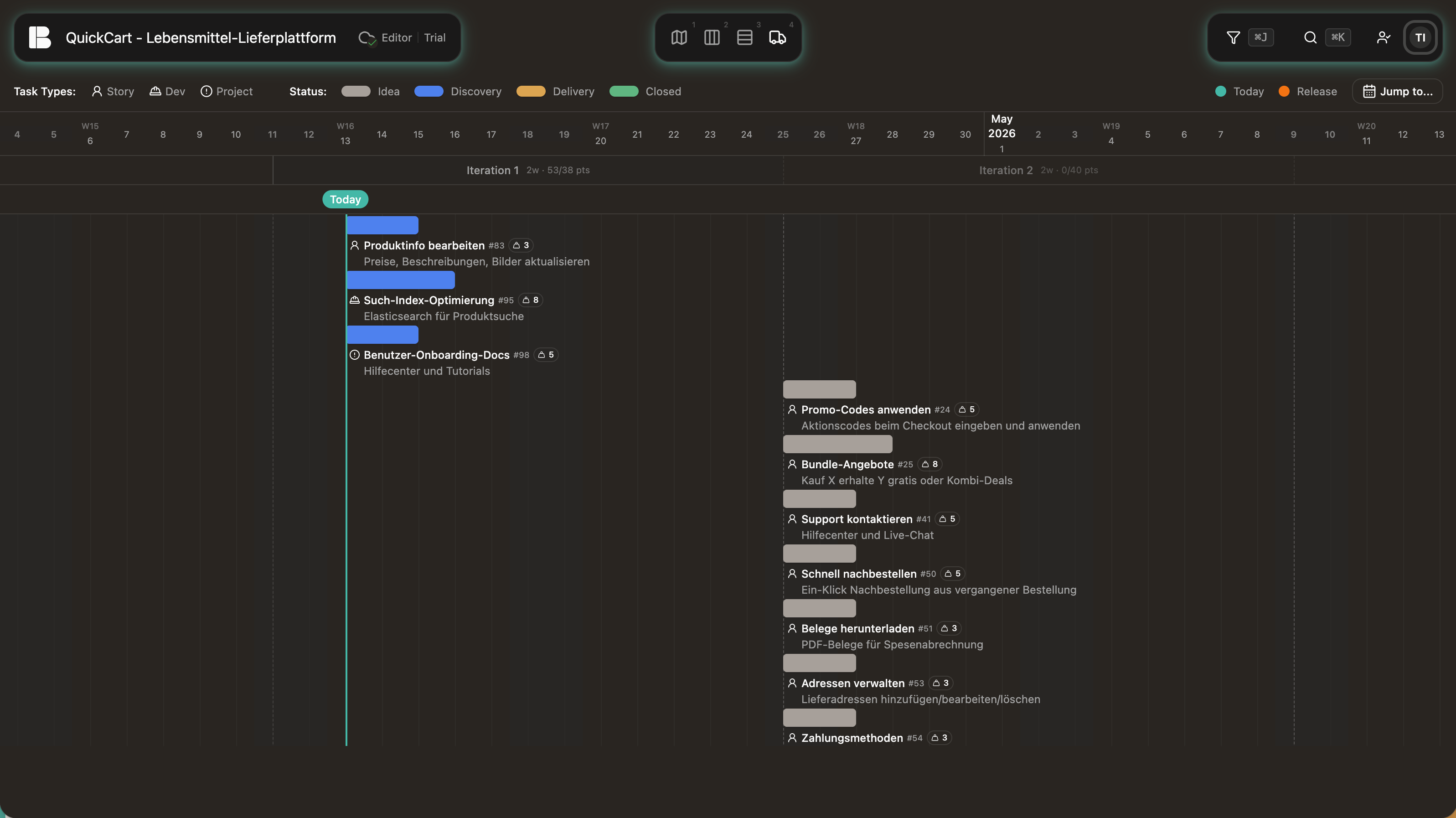
The Delivery Timeline is not a classic planning view where you manually place tasks on a timeline. Instead, it shows the probable course of the endeavor, calculated from the prioritization, Story estimates, and the team’s historical velocity. It adjusts continuously: if priority or pace changes, the forecast updates automatically. You can see what’s already done, what comes next, and when the rest is likely to be finished. This view is especially valuable for stakeholders and anyone who needs to know the current state without getting into the details.
On top of that, important events are recorded: decisions, replanning, external influences. This lets you later trace why things unfolded the way they did. Project Stories work well for this — they make context information visible without mixing it with the actual implementation work.
Releases help you divide the endeavor into meaningful delivery milestones. You assign Stories to a Release and see in the Delivery Timeline when a Release is likely to be complete, based on prioritization and Velocity. Releases can also be used as a filter to focus specifically on one delivery milestone.
Finding your way in Betterplan
Betterplan has several central controls available to you everywhere, regardless of which view you’re currently in.
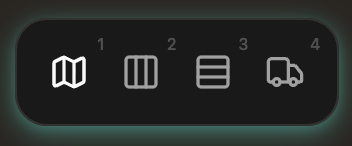
Switching between views
The four main views are accessible via the navigation bar at the top. Each of the four phases has its own icon: Story Map, Backlog, Iteration Board, and Delivery Timeline. One click, and you’re there — or use the keyboard shortcuts 1, 2, 3, 4. Search and filter are available at any time via the global toolbar: ⌘K opens the search, ⌘J opens the filter. Context is preserved. You’re always working on the same endeavor, regardless of which view you’re in.
Search
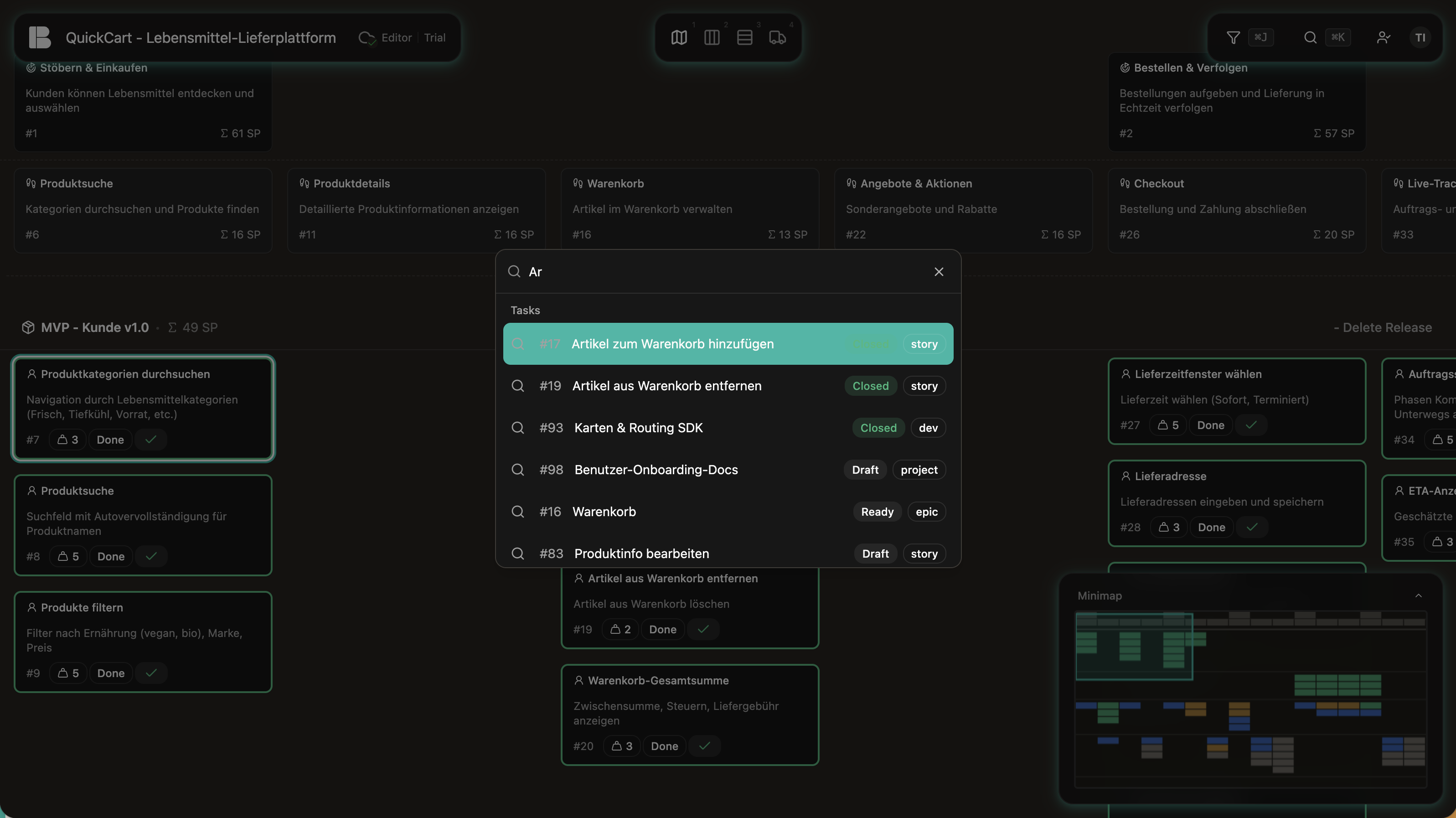
With the global search you can find any Story immediately, no matter how large your Backlog is. It shows results with status and type at a glance, so you can recognize right away what you’ve found. Select a Story and it is focused directly. The focus is maintained even when you switch views: no searching again, no scrolling. Reach the search via the search field at the top or via keyboard shortcut.
Filter
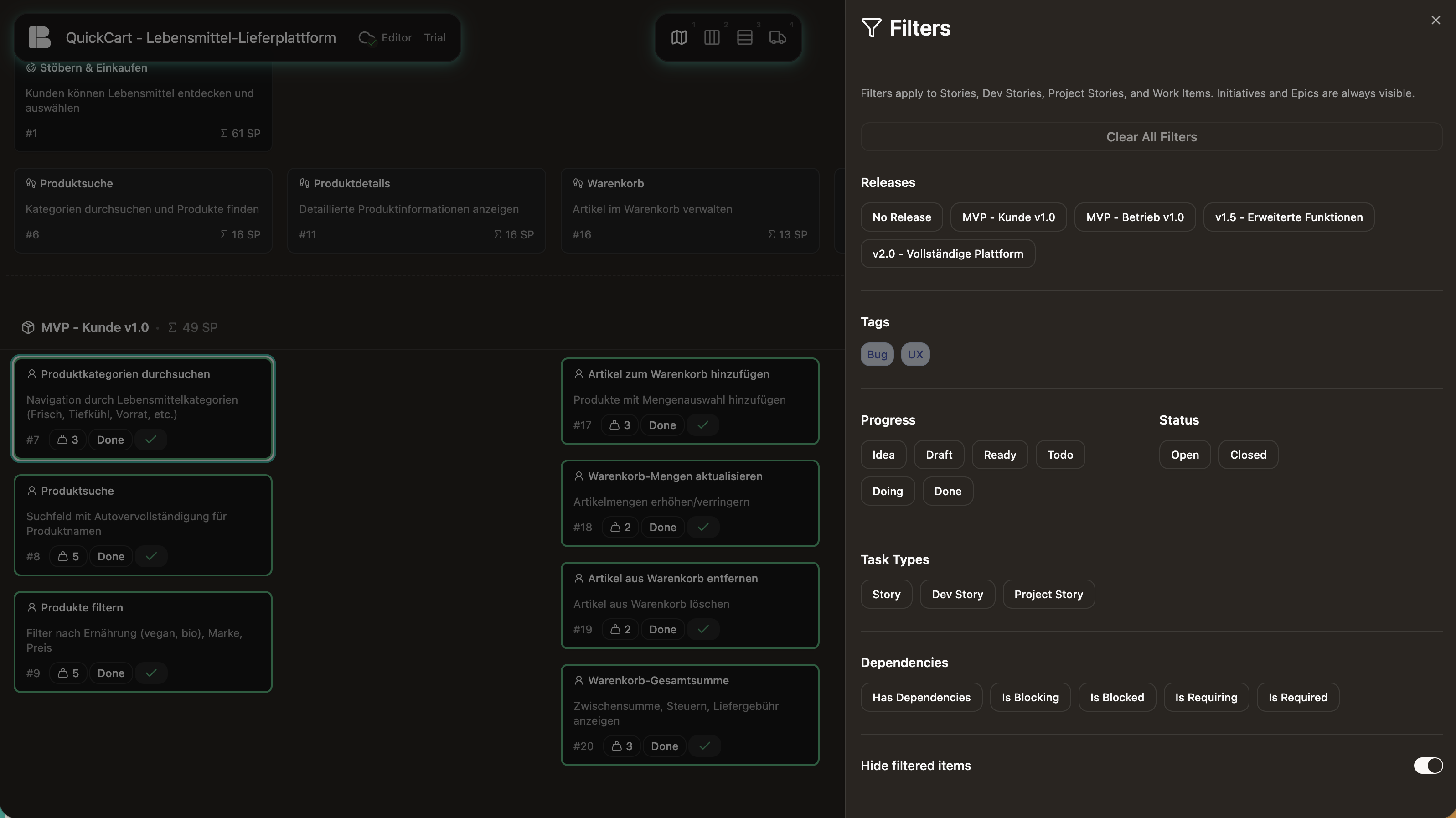
In every view you can narrow down the display using the filter — by maturity level, task type, dependencies, progress, or Releases. This keeps you on top of things even in large endeavors, showing you exactly what’s relevant right now. Filters are also preserved when you switch views. You can focus on a specific set of tasks and follow them across all views. Open the filter area via the filter icon in each view.
Pro tip: Use tags to put together a targeted set of tasks and keep track of them across views. Handy when you want to focus on one topic or follow a particular thread through the endeavor.
Project settings
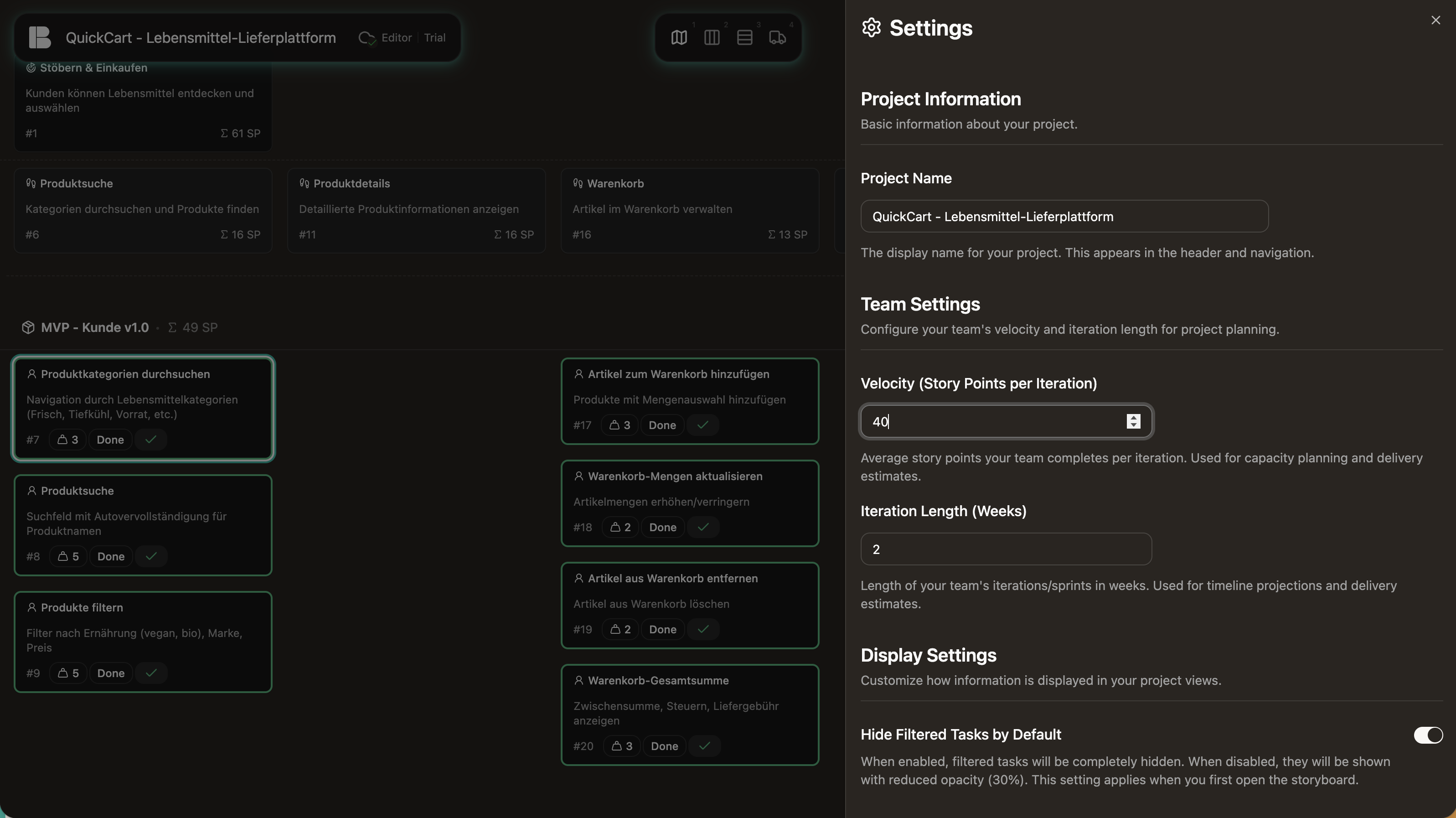
For the Delivery Timeline to produce meaningful forecasts, Betterplan needs two inputs: your team’s Velocity and the Iteration Length (how long is one iteration — two weeks, for example?). Both are set in the project settings. Betterplan handles the rest.
Velocity adjusts automatically after the first few iterations. Betterplan calculates it from the average of the last three iterations. For the start, the rule of thumb is: estimate your Stories and ask yourself honestly what you can realistically finish in two weeks, from Discovery to Delivery. Better to start conservatively than to plan too optimistically.
Editing tasks
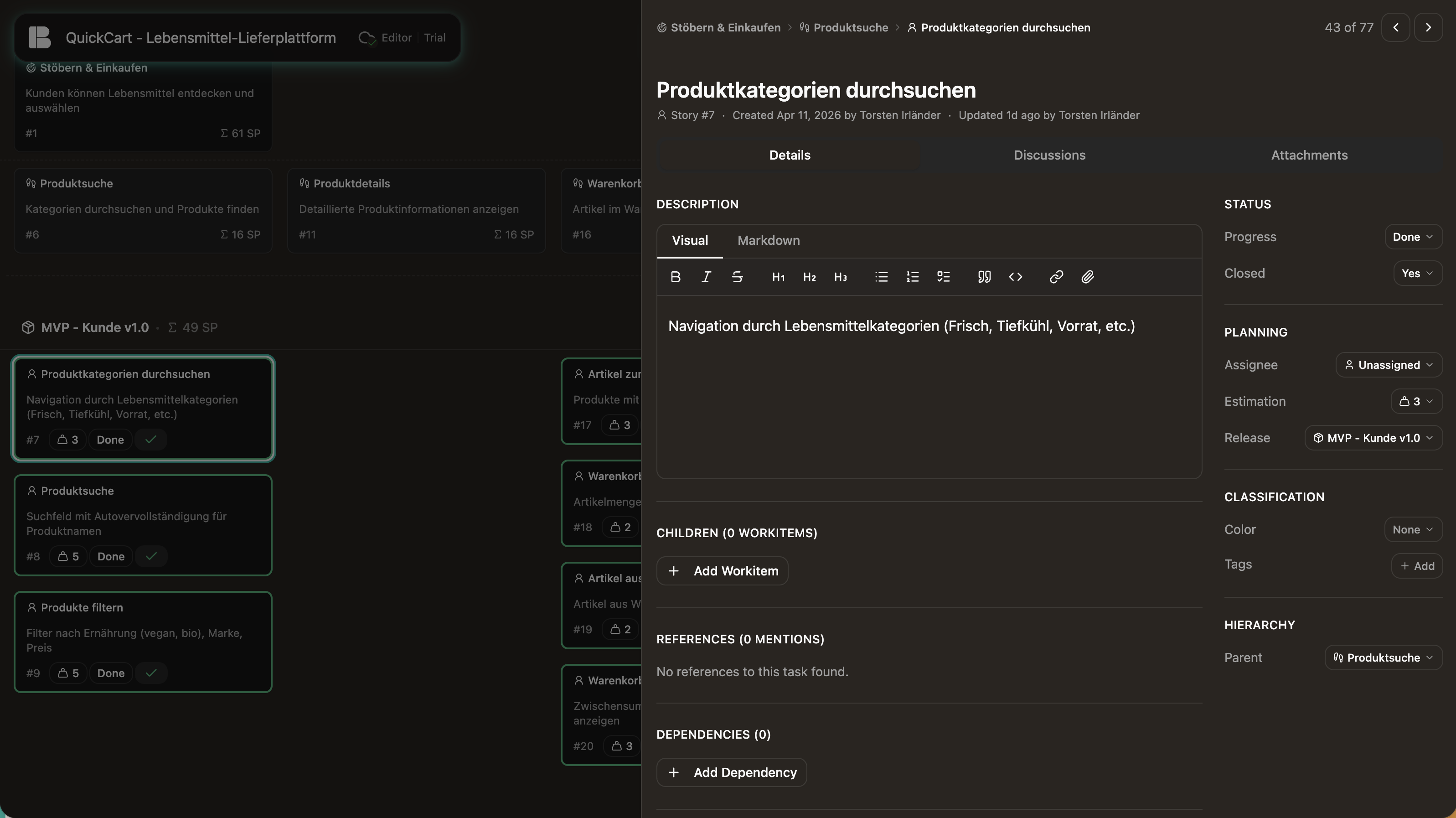
Every Story can be opened directly from any view. The detail panel appears on the side while the view remains visible in the background, so you never lose your context.
The panel brings together everything you know from other trackers:
- Description: Full Markdown support. Structure requirements, record decisions, link resources. Especially useful when working with AI agents: a clear, structured description gives the agent exactly the context it needs.
- Status & planning: Maturity level, Open/Closed, assignee, Release, and estimate. The estimate indicates how much effort a Story requires, in Story Points. Betterplan uses these values together with Velocity to calculate the Delivery Timeline forecast. Workitems have no Story Points and don’t factor into the forecast — they serve coordination, not planning.
- Classification: Tags for thematic grouping, color coding for visual distinction. Both are reflected directly in the filter and Minimap.
- Workitems: Sub-tasks for coordinating implementation, manageable directly from the panel.
- Dependencies: Links to other Stories that must be completed first.
- Discussions: Comments and agreements directly on the Story, not somewhere in a chat tool.
- Attachments: Files and documents belonging to the Story stay where they belong.
- Activity history: Who changed what, and when? Traceable without any extra effort.
The thread connecting everything
All four phases interlock.
In Scope you structure your endeavor and create a shared picture. In Prepare you develop and prioritize the individual parts until they are ready for implementation. In Build you work through them in short cycles. And in Insight you can see whether the pace and direction are on track.
This is not a rigid sequence. You will switch back and forth between phases. New insights from implementation flow back into the Map, the Delivery Timeline updates automatically, and the Backlog reflects the current state. Not every endeavor needs all four phases equally intensively, but each has its purpose — and the matching view is always just one click away.
Glossary
Some terms in this article come from agile product development. Here is a brief overview and pointers to where you can learn more.
- Story Map (User Story Map): A visual method for structuring an endeavor spatially rather than as a flat list. Goes back to Jeff Patton. → Jeff Patton: User Story Mapping (O’Reilly, 2014)
- Backlog: The collected, prioritized list of all tasks to be implemented. Organized as a Kanban board in Betterplan. → Mike Cohn: User Stories Applied (Addison-Wesley, 2004)
- Kanban: A method for making work visible and managing its flow. Tasks move through columns (e.g., Idea → In Progress → Done), and the amount of simultaneous work is deliberately limited. → David J. Anderson: Kanban (Blue Hole Press, 2010)
- Iteration (Sprint): A fixed, recurring time period (e.g., two weeks) during which the team implements a manageable amount of work. At the end, there is a review: What did we learn? What changed? The next iteration is planned on that basis. The plan doesn’t need to be perfect from the start — it gets better with each iteration. → scrum.org/resources/what-is-a-sprint
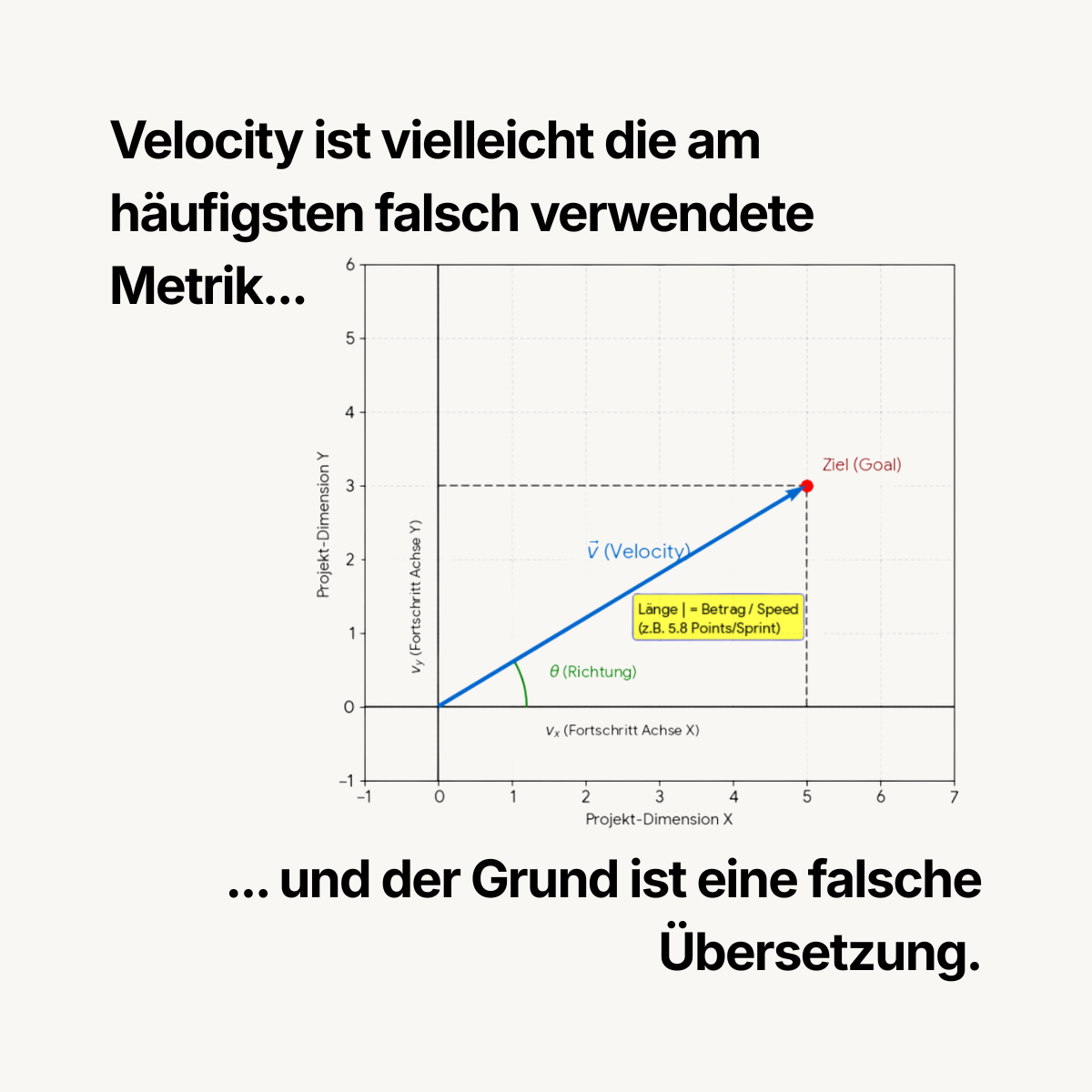
- Velocity: The amount of work a team typically completes per iteration. Betterplan uses Velocity to calculate forecasts.
- Stakeholder: All people who have an interest in the outcome of the endeavor without being directly involved in implementation — e.g., clients, customers, or executives.
- Product Owner: The person who decides what gets implemented next and why. Responsible for prioritizing the Backlog. → scrum.org/resources/what-is-a-product-owner
- Discovery & Delivery (Dual Track): An approach in which exploration (What should we build?) and implementation (Building it.) run in parallel. In Betterplan, every Story moves through both phases without being split into separate tickets. → Marty Cagan: Inspired (Wiley, 2018)
- Daily Standup: A short daily team meeting (usually 15 minutes) to bring everyone up to speed: What did I accomplish? What am I working on today? Where am I stuck?
- Jour fixe: A regularly recurring appointment with a fixed rhythm (e.g., weekly) to discuss progress and make decisions.
- PDCA (Plan-Do-Check-Act): A cycle for continuous improvement: plan, execute, review, adjust, and start again. Goes back to W. Edwards Deming. The four phases in Betterplan follow this pattern.
Your first endeavor — A plan in 5 steps
- Create an endeavor: Create a new endeavor and give it a name that describes the goal.
- Fill in the Story Map: Start with Epics and simply write down everything that comes to mind. The right structure emerges through doing. Some Epics will become User Stories when you realize they are actually options under a larger step. Others will be broken down further because they’re too large. The same goes for Initiatives. Just start — you can restructure at any time.
- Prioritize in the Backlog: Switch to the Backlog. Put the Stories in the right order: What needs to happen first? What has the highest value? Remember: finish first, then start something new.
- Plan the first iteration: Choose a manageable number of Stories for your first iteration. Start with a little — you can add more in the next iteration.
- Check the Delivery Timeline: Take a look at the Delivery Timeline. Even now you can see a preliminary plan: How is the work distributed? When is each part likely to be done? This plan becomes more accurate with every iteration.
You don’t need to get everything right immediately. Betterplan is designed so that your plan develops and sharpens over time.
Questions? No problem! Send me an email at hello@yourbetterplan.com. I’m happy to help you and your team take the first steps toward better planning.